How Niraiya Works: Secure AI Excel Password Recovery
A look under the hood at how we combine browser-based privacy with multi-AI power to get your files back fast.
Last updated: November 11, 2025
The Honest Truth About Password Recovery
Let's be real. Locking yourself out of an important Excel file is a nightmare. You have the data right there in front of you, but you just can't get in.
When you search for a fix, you usually find two bad options: sketchy software that wants you to install who-knows-what, or expensive services charging hundreds of dollars.
I've been there. That frustration is exactly why we built Niraiya. We wanted a solution that feels safe, works fast, and doesn't cost a fortune. No Hollywood hacking scenes—just smart technology solving a real problem.
Our approach is simple: Privacy first, fair pricing, and actual results.
Why We Named It Niraiya
Think about the cheetah. It's the fastest land animal, sure, hitting 70 mph in seconds. But speed isn't its only trick.
A cheetah is hyper-focused. It doesn't run around aimlessly; it locks onto its target with incredible precision.
That blend of speed, accuracy, and clean execution is what we aimed for.
We built our Excel password recovery service to embody that spirit. Fast enough to save your deadline, focused enough to crack complex codes, and clean enough to leave no trace.

The Niraiya Philosophy
Fast: We use a multi-AI cloud infrastructure to recover passwords in minutes, not days.
Focused: We do one thing really well: unlocking Excel files (from version 97 to Microsoft 365).
Trustworthy: Our zero-knowledge architecture means your data stays private from the moment you upload.
Ethical: We are here for legitimate recovery. Honest pricing, clear success rates, no games.
The Multi-AI Advantage: ChatGPT, Gemini, and DeepSeek
Why use one brain when you can use three? Niraiya combines the strengths of the world's leading AI systems to crack passwords faster.
We coordinate OpenAI's ChatGPT, Google's Gemini, and DeepSeek APIs to work together. It's like having a team of experts tackling your locked file from different angles.
Thinking Like a Human
ChatGPT is excellent at understanding how people think.
It knows that humans rarely use truly random strings. We use dates, names, and patterns. ChatGPT predicts these human-like variations to find the most likely passwords first.
Crunching the Numbers
Gemini handles the heavy lifting of probability.
It ranks millions of possibilities, filtering out the unlikely ones so we don't waste time. This computational modeling drastically reduces the time it takes to find the right key.
Learning in Real-Time
DeepSeek is our adaptive learner.
As the recovery runs, DeepSeek analyzes the feedback from each attempt, adjusting our strategy on the fly to zero in on the correct password faster with every second.
Better Together: Each of these AIs is powerful on its own, but combined? They create a recovery engine that is smarter and faster than anything else out there.
This fusion allows Niraiya to unlock Excel files in minutes—tasks that used to take days—while strictly following ethical usage guidelines.
The Four-Step Process
Curious how it works? It's simple. We don't break into your safe; we just look at the lock mechanism to figure out the key.
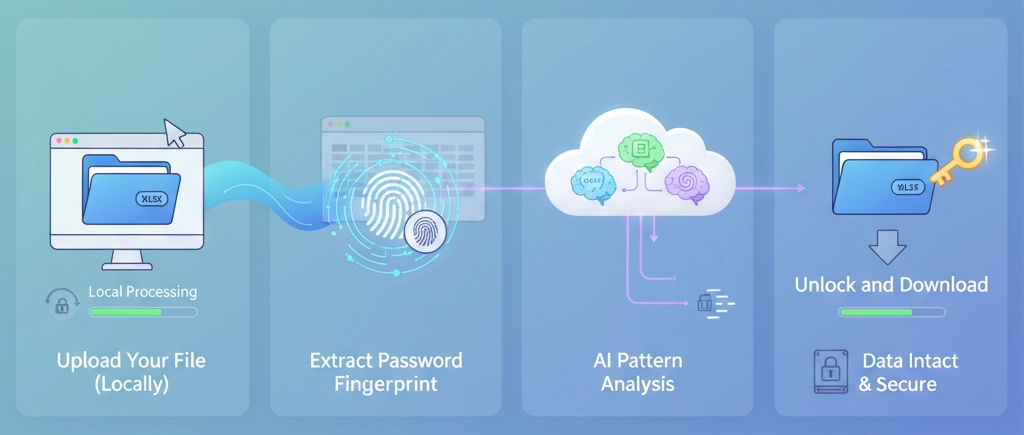
Why Your Data Stays Private
Privacy isn't just a buzzword for us; it's the foundation of our architecture. We designed Niraiya so that we cannot see your data, even if we wanted to.
Here is exactly how we handle your file at every step:
What Never Leaves Your Computer:
- Your actual Excel file content
- Your formulas, cells, and calculations
- Any charts, images, or embedded objects
- Macros and VBA code
- Any personal info inside the spreadsheet
What We Actually Process (Encrypted):
- The cryptographic hash of the password (a mathematical fingerprint)
- The Excel version and encryption type
- File size (just for optimization)
- Basic technical metadata
What We Delete Immediately:
- All processing logs and AI results
- Temporary server cache
- Any record that your file was ever processed
Technical Privacy Guarantee
Even if someone hacked our servers (which are secure, but let's play devil's advocate), they would find nothing useful. It is mathematically impossible to rebuild your spreadsheet from the cryptographic hashes we process.
This is zero-knowledge architecture in action. We don't hold the keys to your kingdom.
What We Can (and Can't) Do
We believe in total transparency. We can't crack every single password in the universe, and we want you to know that upfront.
High Success Rate
- Passwords using common words or names
- Date-based passwords (birthdays, anniversaries)
- Simple variations (like "Password123!")
- Company or project name combinations
- Passwords under 12 characters
- Older Excel files (97-2003 versions)
Lower Success Rate
- Truly random strings (e.g., "x9#mK2$pL")
- Codes generated by password managers
- Extremely long passphrases (12+ chars)
- Files with multiple layers of custom encryption
- Passwords with absolutely no human pattern
- Combining numbers and symbols
Our Honest Take: Because humans are creatures of habit, our AI is fantastic at cracking passwords created by people. However, if you used a military-grade random password generator set to maximum complexity, recovery is unlikely.
We'd rather be honest and save your time than promise miracles we can't deliver.
How It Works: Common Questions
With our multi-AI cloud infrastructure, the majority of Excel password removals are finished in five to fifteen minutes. Password complexity affects recovery time; simple passwords can be cracked more quickly than complex ones.
Our system lets you know exactly what's going on by providing real-time progress updates.
You automatically receive a complete refund if we are unable to crack the password within a day.
We make use of WebAssembly (WASM), a technology that enables sophisticated programs to run almost natively in your web browser. Imagine having a tiny Excel password analyzer integrated into a tab of your browser.
Without sending your actual file anywhere, WASM code examines the file structure, reads the encryption metadata, and extracts the password hash when you drop your file into Niraiya.
For browser-based processing, this is the same technology used by popular programs like Google Earth and AutoCAD.
It is required by security best practices and privacy compliance. We must minimize data retention and remove information once its purpose has been served in accordance with GDPR and related regulations.
But it's just the right thing to do, regardless of the legal requirements.
It takes zero-knowledge architecture very seriously.
Related Pages
Ready to Unlock Your Excel File?
Experience the fastest, most private way to recover Excel passwords. Your file stays yours—always.
Start Password Recovery NowRecovers in 5-15 minute • Zero file uploads • 100% money-back guarantee